What is the safe zone and how close to the edge can text go?
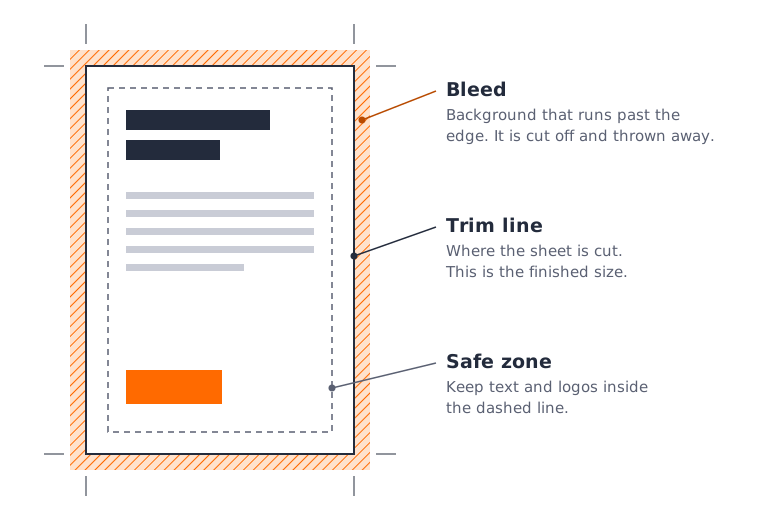
The safe zone is the part of the page that is certain to survive trimming. Keep text, logos and anything else you cannot afford to lose at least 5mm inside the edge of the finished page, and check the product page for the exact figure for your product.
Why it matters
Printed sheets are cut to size in stacks, and the cut can move very slightly from one sheet to the next. Bleed protects the outside of the cut. The safe zone protects the inside. Text that sits right on the edge may be clipped, and even when it survives it looks cramped.
How much to leave
Our standard safe zone is 5mm. Some products differ, so check the product page before you start. Where the product page gives a different figure, follow the product page.
On booklets, leave extra room on the inside edge of each page, where the pages meet at the spine. Content placed there is hard to read once the booklet is bound.
Borders
Avoid thin borders around the edge of the page. Because the cut can move a little, a border that is 3mm wide in your file can come out 2mm on one side and 4mm on the other, and the eye picks it up straight away.
If your design needs a border, make it thick and keep its inner edge at least 5mm inside the trim line, so a small shift is not noticeable. Extend the outer edge of the border into the bleed.
A quick check
Draw a box 5mm inside the edge of your page. Everything that must be read should sit inside it. Backgrounds carry on past it, all the way out to the bleed.